
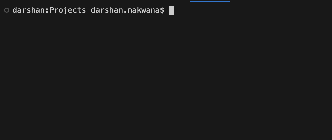
On a late sunday night I started tinkering around with my bash profiles and came to realize I can very much optimize my terminal experience. The figure on the left shows what my terminal looks like currently. The prefix before the $ sign does not contain a lot of information which I can use in my current directory. It displays three things in order, the current host, current dir and the user name
But two of them are not at all needed (hostname and username) when you are working as a developer on projects and sometimes you don’t need only the current dir but also the entire parent path, you want to know what the previous dir is and how you came here. In short this setup is shit and we can do much better. The goal of this writeup is to customize your shell so you can increase your signal to command ratio while cding into a dir i.e we want to gain as much information as possible when entering a new dir while running as few commands as possible
Bash has a very nice feature of primary prompt string (PS1) which we can customize to achieve this. Bash prints this string before it reads our new command in an interactive shell. The default prompt looks like this. Notice this is also the string which display the prefix in left terminal of figure 1
export PS1="\h:\W \u\$ "
Bash expands the escape characters each time this prompt is to be printed, it can also do arithmetic expansion in the prompt if we use $() and we also have the ability to print ANSI colors by wrapping them with \\[ \\]. So in the above prompt bash will expand \h with the hostname, \W with the name of the current working directory and \u with the current username and then print the famous $ sign with \$
Actually bash also provides functionality for continuation prompt (PS2), prompt for select builtin (PS3), prefix used by set -x (PS4) and pre PS1 expansion prompt (PROMPT_COMMAND). But these are not required with what we are trying to do here
The very first thing we would like to do is to get some sense of time about when did we execute the previous command and we also need the complete parent path of the current directory probably in some different color if possible to make it more readable. We can print the time when the command was executed with \t and the full parent path with \w escape characters
export PS1="\n\t \[\e[32m\]\w\[\e[m\] $ "
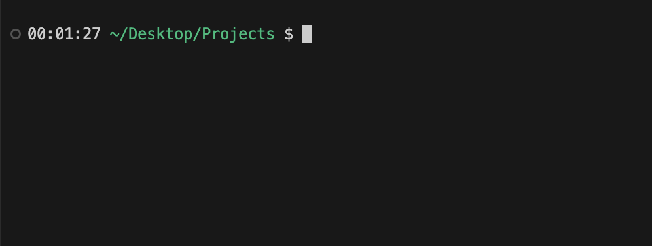
\e[32m is ASCI for green color and \e[m resets it and wrapping them around in \[ \] tells bash to use them as non printing sequences. This is what the terminal looks like now with the above bash prompt
Now to gain more signal let’s display the current branch we are in if we are in a git repo. I occasionally find myself forgetting which branch I am currently in. We can do this with the git branch to parse the current branch we are in and using git status —porcelain which prints one line summary per change if changes are made otherwise it prints empty string. We check if changes are made then print * else nothing 2> /dev/null in the below directs error to hide them this is helpful if we are not in a repo
function parse_git_dirty {
  [[ $(git status --porcelain 2> /dev/null) ]] && echo "*"
}
function parse_git_branch {
  git branch --no-color 2> /dev/null | sed -e '/^[^*]/d' -e "s/* \(.*\)/(\1$(parse_git_dirty)) /"
}

export PS1="\n\t \[\e[32m\]\w\[\e[33m\]\n\$(parse_git_branch)\[\e[m\]$ "
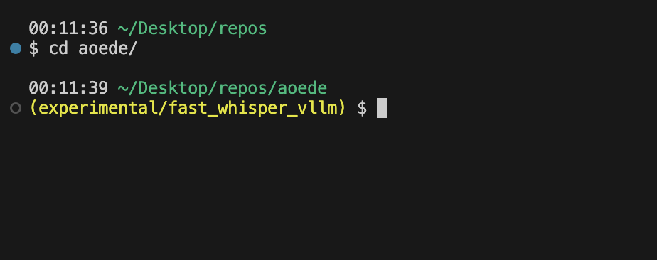
This is what the terminal looks like now with the above changes
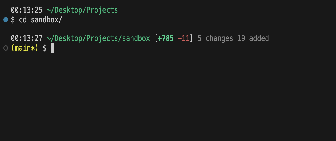
Now this is getting better the only thing this lacks is lack of signal about how many files we have changed and how many lines of insertions and deletions we did. This summary can be parsed from git diff —shortstat HEAD which contains number of added, deleted and the number of files modified. Now extracting the files newly added we will have to smart and use again git status —porcelain and count all lines starting with A mode. This is enough for what we wanted and we can now package this into a nice structure to display. I choose to do something like [+a -b] n changed m added, where a is the lines added, b is the lines deleted and n are files changed while m is failed added. This is all compressed in the PS1 prompt below and the parse_git_stat()
function parse_git_dirty {
  [[ $(git status --porcelain 2> /dev/null) ]] && echo "*"
}
function parse_git_branch {
  git branch --no-color 2> /dev/null | sed -e '/^[^*]/d' -e "s/* \(.*\)/(\1$(parse_git_dirty)) /"
}

function parse_git_stat() {
  local o files ins dels
  o=$(git diff --shortstat HEAD 2>/dev/null) || return
  [[ -z $o ]] && return
  files=$(grep -oE '[0-9]+ files? changed' <<<"$o" | grep -oE '^[0-9]+')
  ins=$(grep -oE '[0-9]+ insertions?\(\+\)' <<<"$o" | grep -oE '^[0-9]+'); [[ -z $ins ]] && ins=0
  dels=$(grep -oE '[0-9]+ deletions?\(-\)'  <<<"$o" | grep -oE '^[0-9]+'); [[ -z $dels ]] && dels=0
  adds=$(git status --porcelain . 2>/dev/null | grep -E '^(A|\?\?) ' | wc -l | tr -d ' ')
  local SO=$'\001' SC=$'\002'
  local G="${SO}"$'\e[1;32m'"${SC}"
  local RD="${SO}"$'\e[31m'"${SC}"
  local GR="${SO}"$'\e[90m'"${SC}"
  local R="${SO}"$'\e[0m'"${SC}"
  echo " [${G}+${ins}${R} ${RD}-${dels}${R}] ${GR}${files:-0} changes ${adds:-0} added${R}"
}

export PS1="\n\t \[\033[32m\]\w\[\033[0m\]\$(parse_git_stat)\n\[\033[33m\]\$(parse_git_branch)\[\033[00m\]$ "
Upading our bash prompt with this now makes our final terminal now looks like
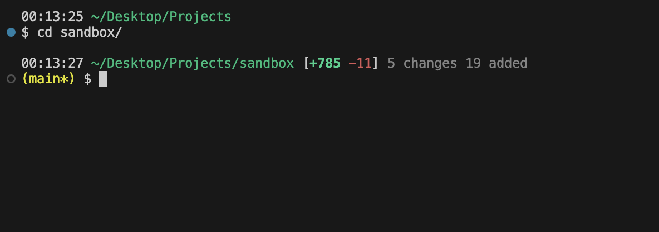
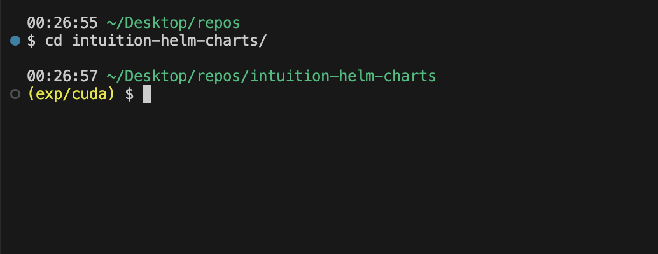
If there are no changes made in the repo it as expected omits the insertion and deletions appropriately