
Table of Contents:
- Running an application in Kubernetes
- First Step with Docker and Kubernetes
- Pods: Running containers in Kubernetes
Microservices are more scalable horizontally compared to monolithics as in monolithics we have to ensure every part and system of the app is scalable horizontally otherwise the system would definitely break. Microservices communicate through synchronous protocols such as HTTP, over which they expose REST(Representational State Transfer)ful APIs or through asynchronous protocols such as AMQP (Advanced Message Queuing Protocol). Because each microservice is a standalone process with a relatively static external API, it’s possible to develop and deploy each microservice separately. Any change to one of them doesn’t require change or redeployment of any other service.
Containers isolate processes using linux namespaces which makes sure each process sees it’s own personal view of the system (files, processes, network instances, hostname and etc) and linux control groups which limits the compute resources the process can consume (CPU, memory, network bandwidth). There are different kind of namespaces like (mount (mnt), process id (pid), network (net), inter process communication (ipc), UTS, User ID (user)) so a process doesn’t belong to one namespace but to one namespace of each kind.
Kubernetes is a software platform that allows you to easily deploy and manage containerized applications on top of it. Deploying through kubernetes is always the same the number of clusters does not matter to kubernetes wether you have 10 nodes or thousand of nodes it’s always the same. The developer can specify that certain apps should run together and kubernetes will deploy them on the same worker node.
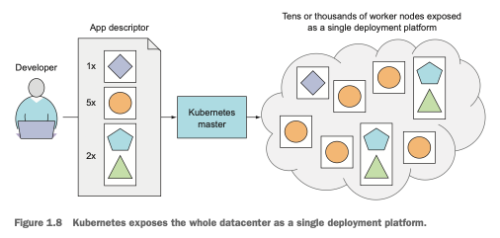
At the hardware level kubernetes cluster consists of control place which manages the scheduling and deployment of applications on worker nodes and worker nodes on which the apps are actually run.
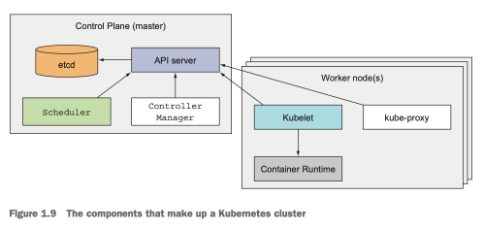
The kubernetes API is what we and other control plane components communicate with, the scheduler which schedules our apps (assigns a co worker to each deployable component of the app), the control manager which performs cluster level functions such as replicating components, keeping track of worker nodes, handling node failures and so on and then finally etcd which is a reliable distributed data store that persistently stores the cluster configuration. The in the worker nodes we have container runtime which actually runs our applications in the container, kubelet which talks to the API server and manages containers on node, the kubernetes service proxy (kube-proxy) which load-balances network traffic between application components.
Running an application in Kubernetes
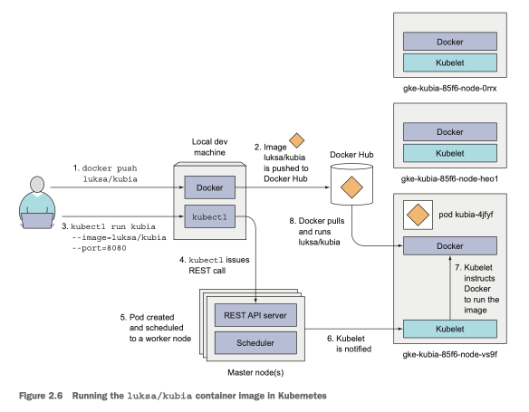
For running an application in kubernetes we first need to package it up into one or more container images and push those images to an image registry and then post a description of our app to the kubernetes API server. The description includes information such as the container image or images that contain our application, how are the components related to each other and which ones need to be run co located (i.e together on the same node) and which don’t.
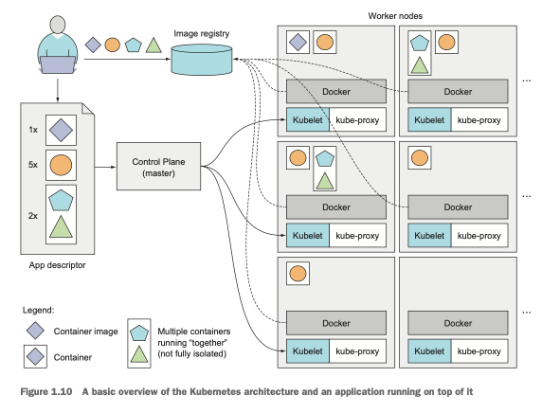
Kubernetes will always make sure that the required number of instances as specified in the app descriptor is running, if an instances crashes kubernetes will spin up another one, is a worker node dies kubernetes will deploy on a different one, additionally we can specify if we want to scale by increasing or decreasing the number of copies of the instances while the application is running.
First Step with Docker and Kubernetes
While creating a docker image with docker build -t container_name . the docker client will first take all the contents of the build dir and pass it to the docker daemon which then pulls the base image from the registry and builds the image.
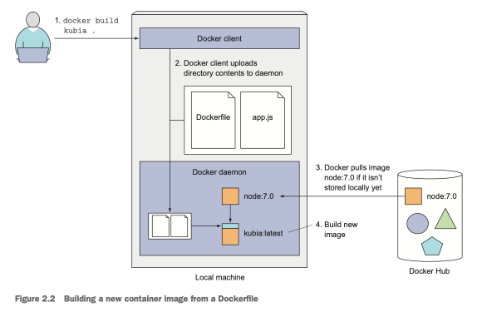
An image is not a single big binary blob but instead contains different layers, also when building an image from docker file the docker daemon creates a new layer for each individual command in the docker file, this is very efficient because many images have shared components and thus will also have shared layers, this prevents unnecessary creation of images.
kubectl run kubia --image=luksa/kubia --port=8080 --generator=run/v1
kubectl get pods
kubectl describe pod <pod_name>
Pods: Running containers in Kubernetes
A pod is a co-located group of containers and represents the basic building block of kubernetes. Instead of deploying containers individually, you always deploy and operate on a pod of containers. All the containers on the pod run on the same worker node. The containers inside each pod share certain resources but not all. Kubernetes achieves this by configuring docker to have all containers of a pod share the same set of linux namespaces instead of each container having it’s own set.
All the containers run under the same Network and UTS namespace they have the same hostname and network interfaces, they also have the same IPC namespace. For filesystems it’s a little different. It’s possible to have containers inside a pod to share file directories using volumes. A container can communicate with other container in a pod with localhost.
So Pods and Kubernetes resources are usually created by posting a JSON or YAML manifest to the kubernetes REST API endpoint.